Mine on a GPU Without Touching a Terminal
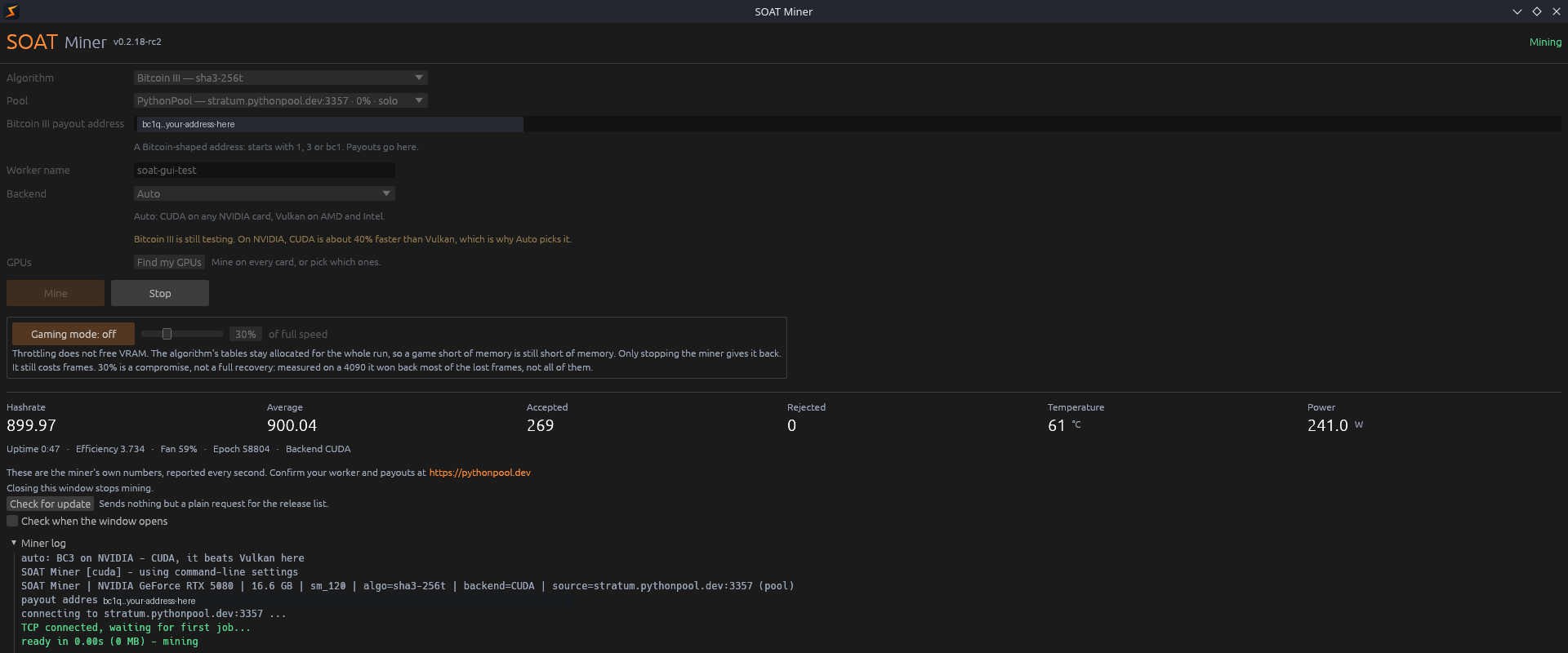
soat-miner has a window now. Pick a coin, pick a pool, paste your address, click Mine. There is no archive to unpack and no config file to edit. This page covers getting it running, the two warnings Windows will show you, and which coins are worth pointing a card at.
Get it
Linux is an AppImage. Windows is an installer. Both carry the miner binaries inside them.
There is no CUDA toolkit to install and no redistributable to chase.
On Linux, make it executable with command chmod +x soat-miner-gui_v0.2.18_x86_64.AppImage and run it.
On Windows, run the installer. Read the next two sections first.
The command line has not gone anywhere. The miner still runs from a terminal exactly as it did, and the mine scripts are unchanged.
First run
Pick your coin.
Pick a pool. Each one lists its fee and its reward scheme, so you are choosing with the numbers in front of you.
Paste your payout address.
Click Mine.
The address field checks itself against the coin you picked. Paste an Ergo address into a Bitcoin III run and it tells you before you mine, not after.
That check is worth more than it sounds. Mining to an address the pool cannot pay is silent, and you find out on payday.
The backend picks itself, per algorithm
Auto is not one choice for the whole miner. It is decided per algorithm, because the right answer differs.
Bitcoin III takes CUDA on NVIDIA, where it runs about 40% faster than Vulkan.
Ergo takes Vulkan on Blackwell, for the same reason in the other direction.
The window says in words what Auto is about to do, so you can disagree with it.
Every card, not just the first
Press Find my GPUs.
It asks the miner which cards it can see rather than guessing.
Tick the ones you want. It runs one miner process per card, with a row each and one total underneath.
Stop stops all of them.
Gaming mode
It is a button. Press it and every card drops to a set share of full speed, 30% by default, so you can play without stopping mining. Press it again and they go back.
Two things it does not do, and the window says both rather than hiding them here.
BE WARNED: throttling does not free VRAM. The algorithm's tables stay allocated for the whole run, so a game short of memory is still short of memory. Only stopping the miner gives that back.
And it still costs frames. 30% is a compromise, not a full recovery. Measured on a 4090 it won back most of the lost frames, not all of them.
From a terminal it is --gaming-throttle N. You can also write the number
into ~/.config/soat-miner/gaming-mode and a running miner picks it up.
It tells you when there is a new version
There is a Check for update button.
It sends nothing but a plain request for the release list. No identifier, no telemetry, nothing about you or your machine.
You can have it check when the window opens. That is a checkbox and it is off by default.
A miner that phones home unasked deserves suspicion, so this one does not.
When it finds a newer version it opens the release page. It never downloads anything and never replaces its own executable.
That last part is deliberate. These binaries ship unsigned and Defender already convicts them by hash. An application that silently rewrites its own executable is exactly the behaviour that turns a heuristic flag into a permanent one.
Which coins are worth your time
Ergo is the mature one. CUDA on NVIDIA, Vulkan on AMD, mining to pools for months.
Bitcoin III is still testing. It is a Bitcoin fork that swapped the block hash to SHA3-256t, so no Bitcoin ASIC can mine it. A SHA-256 machine cannot compute SHA3-256t.
BE WARNED: that is not the same as being ASIC-resistant by design. Nothing about a triple SHA3 raises an ASIC's cost above a GPU's. What protects Bitcoin III today is that the whole network is worth roughly 530 GPUs, so taping out a chip is not worth the money. That is economic protection rather than design protection: it holds while the chain is small and would weaken if the chain grew. Ergo is the contrast. Autolykos2 is protected by design, through a memory-bandwidth floor, so its protection does not depend on the chain's size.
It runs on both vendors, and those two cases are not equally proven. The CUDA path has mined to real pools with shares credited and none rejected. The Vulkan path is checked digest for digest against the same reference, and no pool has taken a share from it yet. If you are on AMD, treat Bitcoin III as something to help test rather than something to earn on until that changes.
Pearl runs on NVIDIA through CUDA and on AMD through Vulkan, including RDNA2. If you were refused on an RX 6000 series card before, you will not be now.
RDNA2 has no matrix cores at all. What it does have is a hardware int8 dot product, and the Vulkan kernel forks on that capability rather than on the vendor string or the card name. An RX 6700 XT runs Pearl end to end and passes the correctness self-check: matrix, Merkle root, commitment chain and transcript all match.
BE WARNED: correct is not the same as fast. That 6700 XT does 0.30 T MAC/s against 179.95 on a 4090 through CUDA. That is 0.17%, and it is not a mining proposition at Pearl's real difficulty. What it buys you is a correct miner instead of a refusal.
BE WARNED: Pearl will not pay for your electricity. At the current network size a card costs far more in power than Pearl pays out. It is in there so the implementation can be tested and kept honest. Mine it to help test it, not for a return.
If you want a coin to leave running, that is Ergo.
Two silent share-losing bugs in Pearl, now fixed
Worth reading even if you do not mine Pearl, because the shape of it is general.
Both bugs were invisible while running. The miner kept working, the readout kept printing a hashrate, and the share counter simply disagreed with what the pool credited.
The cause in both cases was matching JSON as raw bytes. One check looked for the literal
text "result":true. A pool that puts a space after the colon, which is
ordinary conforming JSON, had every reply read as malformed.
The other searched for "id":N and missed "id": N the same way,
and it counted incoming jobs against its own read budget. A pool sending a burst of jobs
pushed the reply out of the window, so a share was recorded as lost. The pool credited it
anyway.
Both are parsed as JSON fields now instead of matched as bytes. If Pearl behaved differently for you on one pool than another, that is why.
The general lesson is the one to keep. Substring matching on a serialised format works until it meets a conforming implementation that formats differently, and then it fails quietly rather than loudly.
Windows will warn you twice, and both are expected
Read this before you install, not after.
Warning one is SmartScreen. It says "Windows protected your PC" and calls the publisher unknown.
That is because there is no code signing certificate yet. The Run anyway button is hidden until you click the small More info link. That is the step people get stuck on.
Warning two is Defender. It flags the miner as a coin miner and refuses to launch it.
That is not a mistake about this binary. Defender flags every GPU miner as a category, including ones you already trust. It is the heuristic doing its job on a real miner.
BE WARNED: a certificate would fix warning one. It would NOT fix warning two. Nothing makes a miner stop being classified as a miner, and anyone telling you otherwise is selling something.
The Defender exclusion is optional
The Windows installer offers to add one, and explains what it means before you accept.
You can decline and install anyway. Declining is a supported choice, not a dead end.
If you accept, it covers the installer's own folder. Not your drive, not your user folder.
Check the file before you run it
Unsigned means the checksum is the only integrity evidence on offer. So use it.
Check it on Windows with command certutil -hashfile <file> SHA256
Check it on Linux with command sha256sum <file>
Every download on the release page has its SHA-256 published beside it. If they differ, do not run it.
What it costs
Nothing, and no dev fee.
Nothing is skimmed off your hashrate. SRBMiner takes 1% on Autolykos. lolMiner takes 1.5%. Their own tables say so.
It is MIT licensed and the source is public, so you can check that rather than believe it.
When this isn't for you
- You already run a rig from the command line. Nothing was removed. The window is an addition and the scripts are unchanged.
- You want a coin to leave running for money. Mine Ergo. Bitcoin III is testing and Pearl does not cover its own power.
- You are on AMD and want Pearl. It runs, RDNA2 included, and it is roughly six hundred times slower than a 4090 on CUDA. Treat it as a correctness result rather than an earner, and mine Bitcoin III or Ergo on that card if you want the hardware doing something useful.
- You cannot get past the warnings. Do not switch Defender off to run a miner. Use the scoped exclusion or do not run it.