UniFi VLAN Isolation Firewall Rules Without Locking Yourself Out
Putting a device on its own VLAN feels like isolation. On most routers, by default, it is not. Here is how to check whether a VLAN has the isolation you assume it does, how to fix it properly, and a real gotcha that silently breaks the one direction you meant to keep working.
The VLAN tag alone doesn't isolate anything
Modern routers with zone-based firewalls group networks into zones. UniFi, pfSense, OPNsense and similar all work this way. By default every "trusted" network you create lands in the same zone as everything else, with a standing rule permitting all traffic between zone members. Create a new VLAN for a specific purpose and it is not automatically isolated. A media network, a smart-home segment, a guest network you upgraded from basic. Check the zone assignment and the rules governing that zone pair before you assume a VLAN is isolated because it has its own subnet.
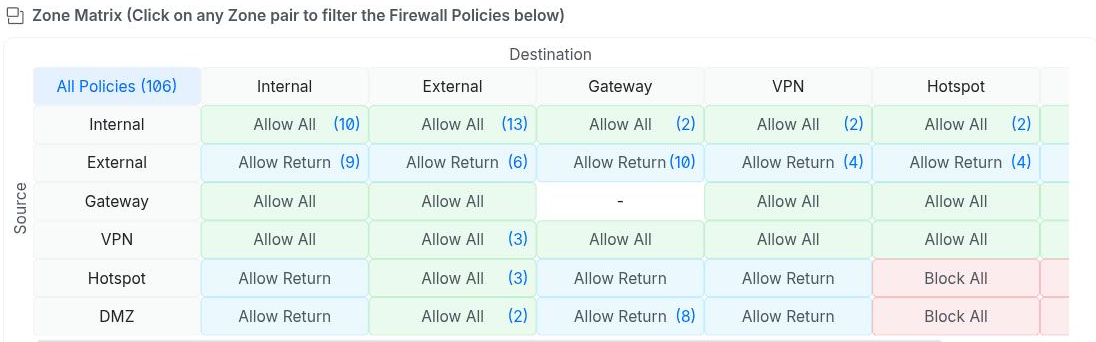
Adding the isolation: one rule, correctly ordered
Most zone-based firewalls evaluate rules in order and stop at the first match. If a rule permitting everything already exists, an "Allow All" within a zone, a new block rule added after it is inert. Traffic hits the allow rule first and never reaches your block. The fix has two parts:
- Scope the block rule to the specific network you want isolated as the source. Set the destination to the whole zone, or to the specific other networks you want it blocked from.
- Place it before the existing "allow everything" rule in evaluation order. Most UIs have a drag-and-drop reorder view, or an explicit priority you can set directly.
Scope the block rule's source specifically rather than "any" and traffic in the other direction is unaffected. Your management network reaching into the isolated VLAN for admin access, monitoring or a reverse proxy never matches the block rule's source condition at all.
The gotcha that will break the direction you meant to keep
Fix: scope the block rule's connection-state matching to new connections only. Sometimes labeled "New" plus "Invalid", excluding "Established" and "Related". That blocks the isolated VLAN from initiating anything into your other networks and leaves already-permitted connections' return traffic untouched, whichever network technically owns the reply packets.
A second gotcha: your new block rule can shadow something added later, by someone else
Fix: whenever you add a specific-purpose allow rule to a zone pair that already has a block rule in it, check its position against every existing rule in that pair. Not just whether it is configured correctly on its own. The order that works is specific carve-outs first, broad isolation blocks next, broad catch-all allows last.
Lesson: when a specific-purpose rule does not work despite looking correct in isolation, check whether a broader block in the same zone pair now sits above it. Especially if that block was added by someone else, or in an earlier session, for an unrelated reason. It is easy to test your own new rule in isolation and never notice it is shadowed.
Verifying it actually worked
Do not trust ping alone in either direction. On some routers ICMP is deprioritized or filtered independently of your actual rule, which gives you a false failure or a false success. Test with a real connection instead:
# From the network that should still have access:
curl -s -o /dev/null -w '%{http_code}\n' http://<isolated-vlan-host>:<port>/

# From inside the isolated network, toward somewhere that should now be blocked:
timeout 5 bash -c "echo > /dev/tcp/<other-network-host>/<port>" && echo REACHED || echo BLOCKED
Confirm both directions explicitly. The network you isolated can no longer reach elsewhere. And everything that depended on reaching into it still works exactly as before. Admin access, reverse proxies, monitoring.